Quality Control on in-silico spatial proteomics with Harpy#
Introduction#
This noteboook outlines some quality controls steps for highly-multiplexed spatial proteomics data using the Harpy package. Most steps are similar to this good resource on Imaging Mass Cytometry data analysis in R from the Bodenmiller lab. Here, an artificial in-silico dataset is used to demonstrate the quality control steps.
The levels of quality control are:
Image level: to give an overview of the quality of the images in the dataset.
Segmentation level: to give an overview of the quality of the segmentation in the dataset.
Cell level: to give an overview of the quality of the calculated features per cell in the dataset.
We start by loading in an example dataset and visualising the data:
import harpy
import matplotlib.pyplot as plt
import spatialdata_plot  # noqa
import scanpy as sc
from harpy.datasets import multisample_blobs

plt.viridis()

sdata = multisample_blobs(n_samples=4)
sdata
The autoreload extension is already loaded. To reload it, use:
  %reload_ext autoreload
INFO     no axes information specified in the object, setting `dims` to: ('c', 'y', 'x')
INFO     no axes information specified in the object, setting `dims` to: ('y', 'x')
INFO     no axes information specified in the object, setting `dims` to: ('c', 'y', 'x')
INFO     no axes information specified in the object, setting `dims` to: ('y', 'x')
INFO     no axes information specified in the object, setting `dims` to: ('c', 'y', 'x')
INFO     no axes information specified in the object, setting `dims` to: ('y', 'x')
INFO     no axes information specified in the object, setting `dims` to: ('c', 'y', 'x')
INFO     no axes information specified in the object, setting `dims` to: ('y', 'x')
SpatialData object
├── Images
│     ├── 'sample_0_image': DataArray[cyx] (11, 512, 512)
│     ├── 'sample_1_image': DataArray[cyx] (11, 512, 512)
│     ├── 'sample_2_image': DataArray[cyx] (11, 512, 512)
│     └── 'sample_3_image': DataArray[cyx] (11, 512, 512)
├── Labels
│     ├── 'sample_0_labels': DataArray[yx] (512, 512)
│     ├── 'sample_1_labels': DataArray[yx] (512, 512)
│     ├── 'sample_2_labels': DataArray[yx] (512, 512)
│     └── 'sample_3_labels': DataArray[yx] (512, 512)
├── Points
│     ├── 'sample_0_points': DataFrame with shape: (<Delayed>, 2) (2D points)
│     ├── 'sample_1_points': DataFrame with shape: (<Delayed>, 2) (2D points)
│     ├── 'sample_2_points': DataFrame with shape: (<Delayed>, 2) (2D points)
│     └── 'sample_3_points': DataFrame with shape: (<Delayed>, 2) (2D points)
└── Tables
      ├── 'sample_0_table': AnnData (20, 11)
      ├── 'sample_1_table': AnnData (20, 11)
      ├── 'sample_2_table': AnnData (20, 11)
      ├── 'sample_3_table': AnnData (20, 11)
      └── 'table': AnnData (80, 11)
with coordinate systems:
    ▸ 'sample_0', with elements:
        sample_0_image (Images), sample_0_labels (Labels), sample_0_points (Points)
    ▸ 'sample_1', with elements:
        sample_1_image (Images), sample_1_labels (Labels), sample_1_points (Points)
    ▸ 'sample_2', with elements:
        sample_2_image (Images), sample_2_labels (Labels), sample_2_points (Points)
    ▸ 'sample_3', with elements:
        sample_3_image (Images), sample_3_labels (Labels), sample_3_points (Points)
<Figure size 640x480 with 0 Axes>
table = sdata["table"]
table.to_df()
| nucleus | lineage_0 | lineage_1 | lineage_2 | lineage_3 | lineage_4 | lineage_5 | lineage_6 | lineage_7 | lineage_8 | lineage_9 | |
|---|---|---|---|---|---|---|---|---|---|---|---|
| cells | |||||||||||
| 1 | 130579.074583 | 73143.384718 | 90176.329291 | 78887.342227 | 83547.398858 | 0.000000 | 85104.954042 | 89203.618952 | 71052.452962 | 166453.784109 | 79783.723973 |
| 2 | 97747.257070 | 44127.352051 | 54403.315415 | 47592.677537 | 50404.086393 | 0.000000 | 51343.758329 | 103611.315408 | 42865.894408 | 48557.293269 | 48133.464008 |
| 3 | 129783.693347 | 72871.920340 | 89159.713324 | 77997.994298 | 82605.515103 | 0.000000 | 132335.765591 | 88197.968976 | 70251.432797 | 79581.243727 | 78884.270554 |
| 4 | 126967.536598 | 69764.494608 | 86010.594981 | 159287.142678 | 79687.890840 | 0.000000 | 81180.370216 | 85082.819414 | 67770.154343 | 76768.146443 | 76776.118424 |
| 5 | 107214.353348 | 52460.254002 | 64676.705321 | 56579.963133 | 124573.992918 | 0.000000 | 61039.388909 | 63979.053282 | 50960.585762 | 57726.734557 | 57222.870407 |
| ... | ... | ... | ... | ... | ... | ... | ... | ... | ... | ... | ... |
| 16 | 161696.495625 | 84635.637309 | 175638.724282 | 105850.500384 | 102504.128585 | 88371.831230 | 106509.552476 | 97690.881838 | 97966.012854 | 96128.415489 | 0.000000 |
| 17 | 163295.271990 | 86338.942986 | 93873.258186 | 107784.066049 | 104567.040494 | 90150.328405 | 108653.074179 | 188483.571632 | 99937.594462 | 98063.015157 | 0.000000 |
| 18 | 153201.459416 | 75869.389265 | 82490.085245 | 94714.053483 | 91887.127930 | 80816.560758 | 95477.684746 | 87572.419579 | 175560.397181 | 86171.787748 | 0.000000 |
| 19 | 154421.629069 | 153238.714827 | 83799.306745 | 96217.284748 | 93345.492327 | 80475.900902 | 96993.035800 | 88962.304123 | 89212.852472 | 88883.535945 | 0.000000 |
| 20 | 161275.579840 | 84186.643485 | 175348.640010 | 105097.641133 | 101960.342041 | 87903.016819 | 105944.517075 | 97172.629669 | 97446.301109 | 95618.452236 | 0.000000 |
80 rows × 11 columns
table.var
| cycle | |
|---|---|
| nucleus | 0 |
| lineage_0 | 0 |
| lineage_1 | 1 |
| lineage_2 | 1 |
| lineage_3 | 2 |
| lineage_4 | 2 |
| lineage_5 | 3 |
| lineage_6 | 3 |
| lineage_7 | 4 |
| lineage_8 | 4 |
| lineage_9 | 5 |
table.obs
| instance_id | region | fov_labels | cell_ID | phenotype | area | eccentricity | major_axis_length | minor_axis_length | perimeter | centroid-0 | centroid-1 | convex_area | equivalent_diameter | _major_minor_axis_ratio | _perim_square_over_area | _major_axis_equiv_diam_ratio | _convex_hull_resid | _centroid_dif | |
|---|---|---|---|---|---|---|---|---|---|---|---|---|---|---|---|---|---|---|---|
| cells | |||||||||||||||||||
| 1 | 1 | by | sample_0_labels | 1 | 8 | 2393.0 | 0.000000 | 55.199096 | 55.199096 | 180.852814 | 482.000000 | 410.000000 | 2433.0 | 55.198390 | 1.000000 | 13.668090 | 1.000013 | 0.016441 | 0.000000 |
| 2 | 2 | by | sample_0_labels | 2 | 6 | 1489.0 | 0.840912 | 60.858245 | 32.934784 | 160.083261 | 161.000000 | 12.721961 | 1519.0 | 43.541402 | 1.847841 | 17.210645 | 1.397710 | 0.019750 | 0.003520 |
| 3 | 3 | by | sample_0_labels | 3 | 5 | 2332.0 | 0.296286 | 55.821777 | 53.315330 | 179.338095 | 369.522298 | 388.423671 | 2375.0 | 54.490317 | 1.047012 | 13.791661 | 1.024435 | 0.018105 | 0.001060 |
| 4 | 4 | by | sample_0_labels | 4 | 2 | 2352.0 | 0.249266 | 55.649195 | 53.892628 | 180.852814 | 64.180697 | 106.579082 | 2397.0 | 54.723481 | 1.032594 | 13.906352 | 1.016916 | 0.018773 | 0.001168 |
| 5 | 5 | by | sample_0_labels | 5 | 3 | 1706.0 | 0.765745 | 59.549068 | 38.298639 | 166.083261 | 216.000000 | 495.966002 | 1734.0 | 46.606294 | 1.554861 | 16.168611 | 1.277704 | 0.016148 | 0.002416 |
| ... | ... | ... | ... | ... | ... | ... | ... | ... | ... | ... | ... | ... | ... | ... | ... | ... | ... | ... | ... |
| 16 | 16 | by | sample_3_labels | 16 | 1 | 2856.0 | 0.198505 | 60.937241 | 59.724580 | 198.409163 | 328.041317 | 117.297969 | 2911.0 | 60.302339 | 1.020304 | 13.783682 | 1.010529 | 0.018894 | 0.001298 |
| 17 | 17 | by | sample_3_labels | 17 | 6 | 2885.0 | 0.000000 | 60.607577 | 60.607577 | 197.823376 | 245.000000 | 470.000000 | 2933.0 | 60.607723 | 1.000000 | 13.564675 | 0.999998 | 0.016365 | 0.000000 |
| 18 | 18 | by | sample_3_labels | 18 | 7 | 2616.0 | 0.508391 | 62.616366 | 53.920614 | 194.793939 | 110.995413 | 406.372706 | 2680.0 | 57.713037 | 1.161270 | 14.504847 | 1.084961 | 0.023881 | 0.003410 |
| 19 | 19 | by | sample_3_labels | 19 | 0 | 2665.0 | 0.466229 | 62.247488 | 55.068120 | 193.036580 | 227.496060 | 153.503940 | 2703.0 | 58.251038 | 1.130372 | 13.982409 | 1.068607 | 0.014058 | 0.001451 |
| 20 | 20 | by | sample_3_labels | 20 | 1 | 2844.0 | 0.237913 | 61.101562 | 59.347125 | 196.509668 | 27.427215 | 169.000000 | 2890.0 | 60.175520 | 1.029562 | 13.578077 | 1.015389 | 0.015917 | 0.000612 |
80 rows × 19 columns
selected_markers = table.var_names[:3].tolist()
selected_markers
['nucleus', 'lineage_0', 'lineage_1']
sdata.pl.render_images(channel=selected_markers).pl.render_labels().pl.show()

Image level quality control#
table.var["cycle"]
nucleus      0
lineage_0    0
lineage_1    1
lineage_2    1
lineage_3    2
lineage_4    2
lineage_5    3
lineage_6    3
lineage_7    4
lineage_8    4
lineage_9    5
Name: cycle, dtype: int64
df = harpy.pl.calculate_snr_ratio(sdata, cycles="cycle")
df
| image | cycle | channel | snr | signal | |
|---|---|---|---|---|---|
| 0 | sample_0_image | 0 | nucleus | 3.287837 | 73.395618 |
| 1 | sample_0_image | 0 | lineage_0 | 3.350054 | 60.223873 |
| 2 | sample_0_image | 1 | lineage_1 | 3.341242 | 71.868568 |
| 3 | sample_0_image | 1 | lineage_2 | 3.339835 | 62.863215 |
| 4 | sample_0_image | 2 | lineage_3 | 3.341236 | 66.354626 |
| 5 | sample_0_image | 2 | lineage_4 | NaN | NaN |
| 6 | sample_0_image | 3 | lineage_5 | 3.328766 | 68.452983 |
| 7 | sample_0_image | 3 | lineage_6 | 3.333190 | 71.719604 |
| 8 | sample_0_image | 4 | lineage_7 | 3.341090 | 56.638927 |
| 9 | sample_0_image | 4 | lineage_8 | 3.346352 | 65.247809 |
| 10 | sample_0_image | 5 | lineage_9 | 3.351038 | 65.531110 |
| 11 | sample_1_image | 0 | nucleus | 3.317217 | 68.429706 |
| 12 | sample_1_image | 0 | lineage_0 | 3.354614 | 57.989819 |
| 13 | sample_1_image | 1 | lineage_1 | 3.347276 | 68.978197 |
| 14 | sample_1_image | 1 | lineage_2 | 3.353919 | 63.870013 |
| 15 | sample_1_image | 2 | lineage_3 | 3.345361 | 55.801995 |
| 16 | sample_1_image | 2 | lineage_4 | 3.340518 | 72.187184 |
| 17 | sample_1_image | 3 | lineage_5 | 3.348367 | 66.388941 |
| 18 | sample_1_image | 3 | lineage_6 | 3.345955 | 63.479419 |
| 19 | sample_1_image | 4 | lineage_7 | 3.345319 | 63.756732 |
| 20 | sample_1_image | 4 | lineage_8 | 3.354425 | 67.277019 |
| 21 | sample_1_image | 5 | lineage_9 | 3.351014 | 68.710552 |
| 22 | sample_2_image | 0 | nucleus | 3.285106 | 72.556726 |
| 23 | sample_2_image | 0 | lineage_0 | 3.346338 | 66.941166 |
| 24 | sample_2_image | 1 | lineage_1 | 3.348429 | 58.152628 |
| 25 | sample_2_image | 1 | lineage_2 | 3.354761 | 64.411135 |
| 26 | sample_2_image | 2 | lineage_3 | 3.342676 | 62.753927 |
| 27 | sample_2_image | 2 | lineage_4 | 3.343551 | 62.706414 |
| 28 | sample_2_image | 3 | lineage_5 | 3.346515 | 65.341556 |
| 29 | sample_2_image | 3 | lineage_6 | 3.346694 | 68.759239 |
| 30 | sample_2_image | 4 | lineage_7 | 3.340821 | 65.563372 |
| 31 | sample_2_image | 4 | lineage_8 | 3.342025 | 63.964066 |
| 32 | sample_2_image | 5 | lineage_9 | 3.342700 | 61.233602 |
| 33 | sample_3_image | 0 | nucleus | 3.409306 | 74.062011 |
| 34 | sample_3_image | 0 | lineage_0 | 3.354025 | 59.879868 |
| 35 | sample_3_image | 1 | lineage_1 | 3.355139 | 65.147514 |
| 36 | sample_3_image | 1 | lineage_2 | 3.346811 | 72.394797 |
| 37 | sample_3_image | 2 | lineage_3 | 3.345158 | 69.136590 |
| 38 | sample_3_image | 2 | lineage_4 | 3.347905 | 60.523140 |
| 39 | sample_3_image | 3 | lineage_5 | 3.344262 | 71.837665 |
| 40 | sample_3_image | 3 | lineage_6 | 3.349851 | 66.981595 |
| 41 | sample_3_image | 4 | lineage_7 | 3.344799 | 66.048378 |
| 42 | sample_3_image | 4 | lineage_8 | 3.351530 | 66.949340 |
| 43 | sample_3_image | 5 | lineage_9 | NaN | NaN |
df = df.groupby(["image", "channel"]).mean(numeric_only=True)
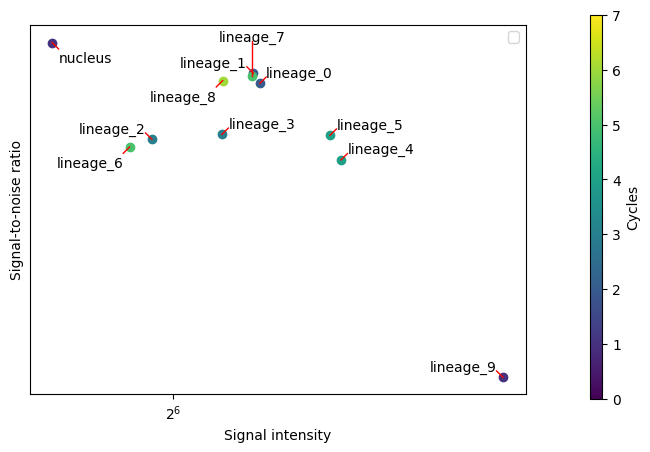
harpy.pl.snr_ratio(sdata, color="cycle")
<Axes: xlabel='Signal intensity', ylabel='Signal-to-noise ratio'>
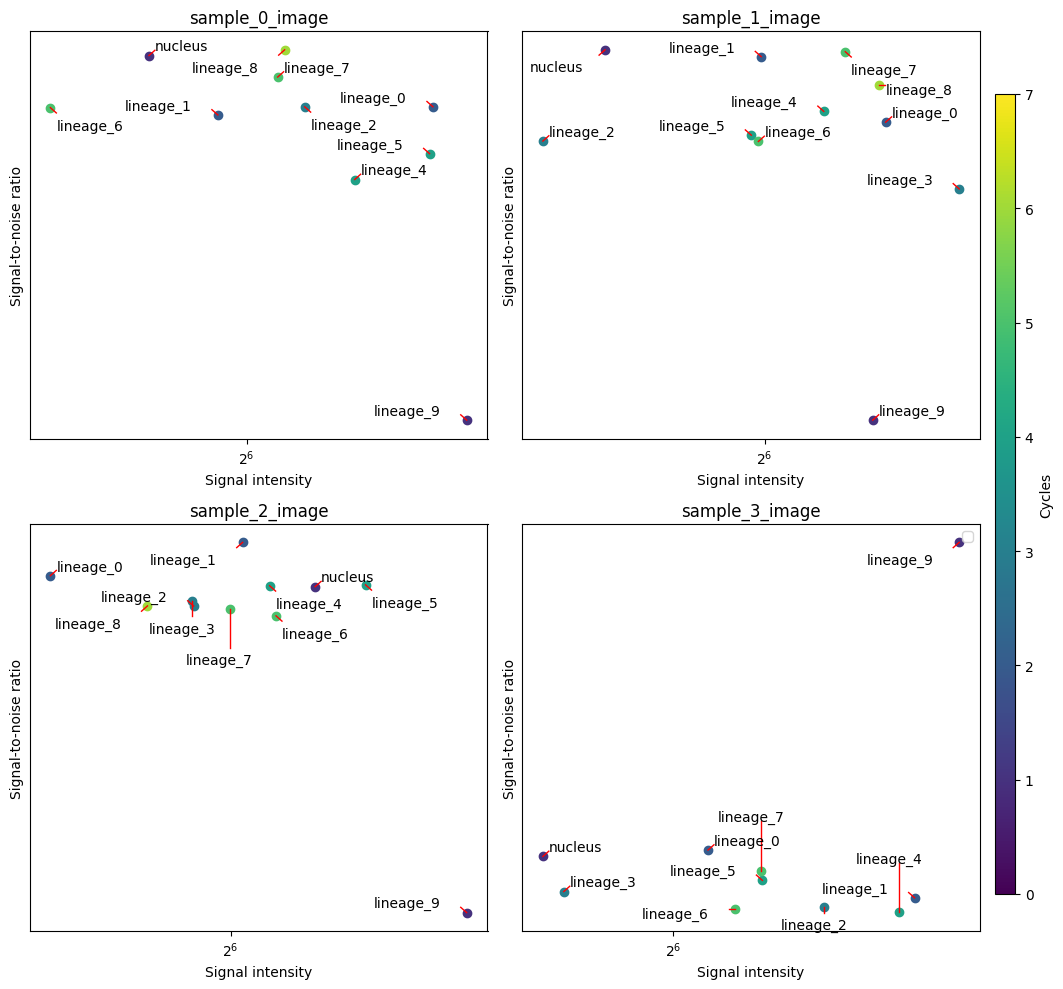
harpy.pl.group_snr_ratio(sdata, groupby=["image", "channel"], color="cycle")
array([[<Axes: title={'center': 'sample_0_image'}, xlabel='Signal intensity', ylabel='Signal-to-noise ratio'>,
        <Axes: title={'center': 'sample_1_image'}, xlabel='Signal intensity', ylabel='Signal-to-noise ratio'>],
       [<Axes: title={'center': 'sample_2_image'}, xlabel='Signal intensity', ylabel='Signal-to-noise ratio'>,
        <Axes: title={'center': 'sample_3_image'}, xlabel='Signal intensity', ylabel='Signal-to-noise ratio'>]],
      dtype=object)
harpy.pl.snr_ratio(sdata, signal_threshold=2)
<Axes: xlabel='Signal intensity', ylabel='Signal-to-noise ratio'>
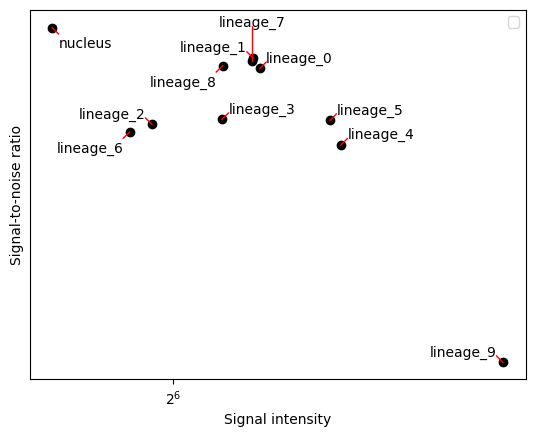
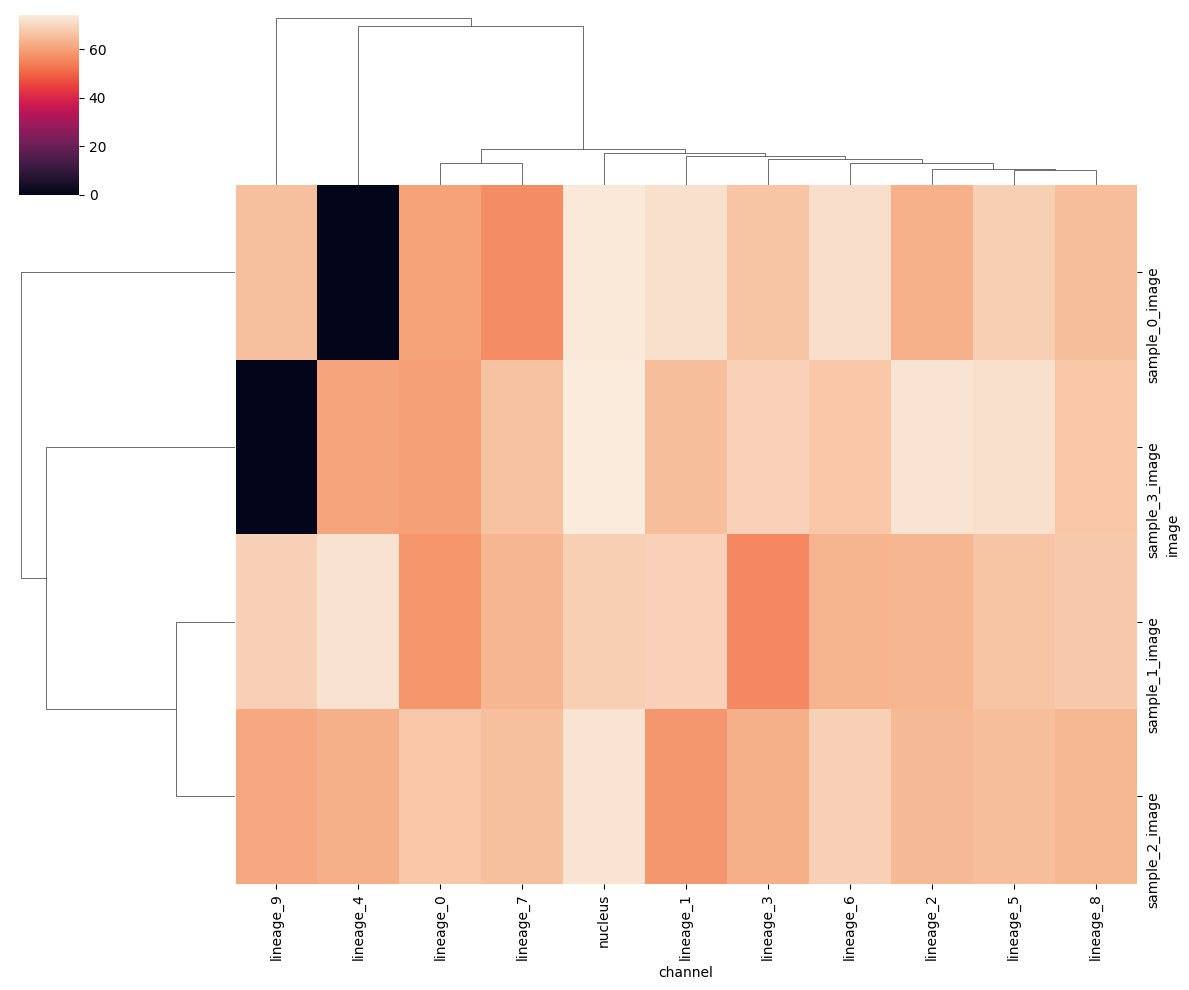
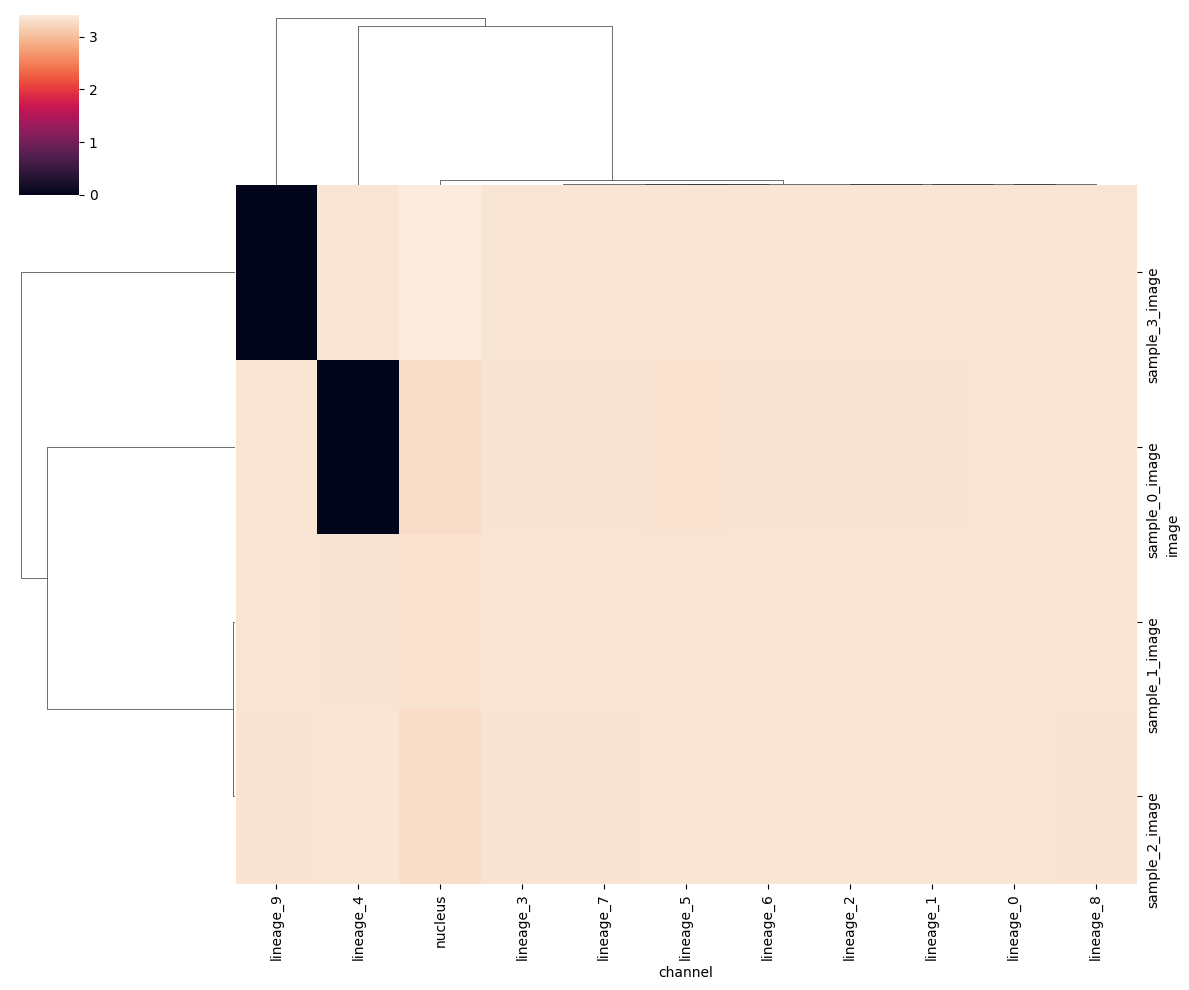
The plots above summarize all samples together. It would be interesting to look without cell segmentation bias across all channels and samples. There are multiple ways to aggregate the channel signal on an image level to a heatmap. One way is to create heatmaps using the SNR and signal values calculated above. This again depends on the unsupervised Otsu thresholding and is not a very good proxy of a good cell segmentation.
When showing the heatmap you could use the z_score or standard_scale options, but it’s also interesting not to transform the data too much in order to still visualize the outliers.
harpy.pl.signal_clustermap(sdata, signal_threshold=2, figsize=(12, 10))
<seaborn.matrix.ClusterGrid at 0x37bb615d0>
harpy.pl.snr_clustermap(sdata, signal_threshold=2, figsize=(12, 10))
<seaborn.matrix.ClusterGrid at 0x37cd5d600>
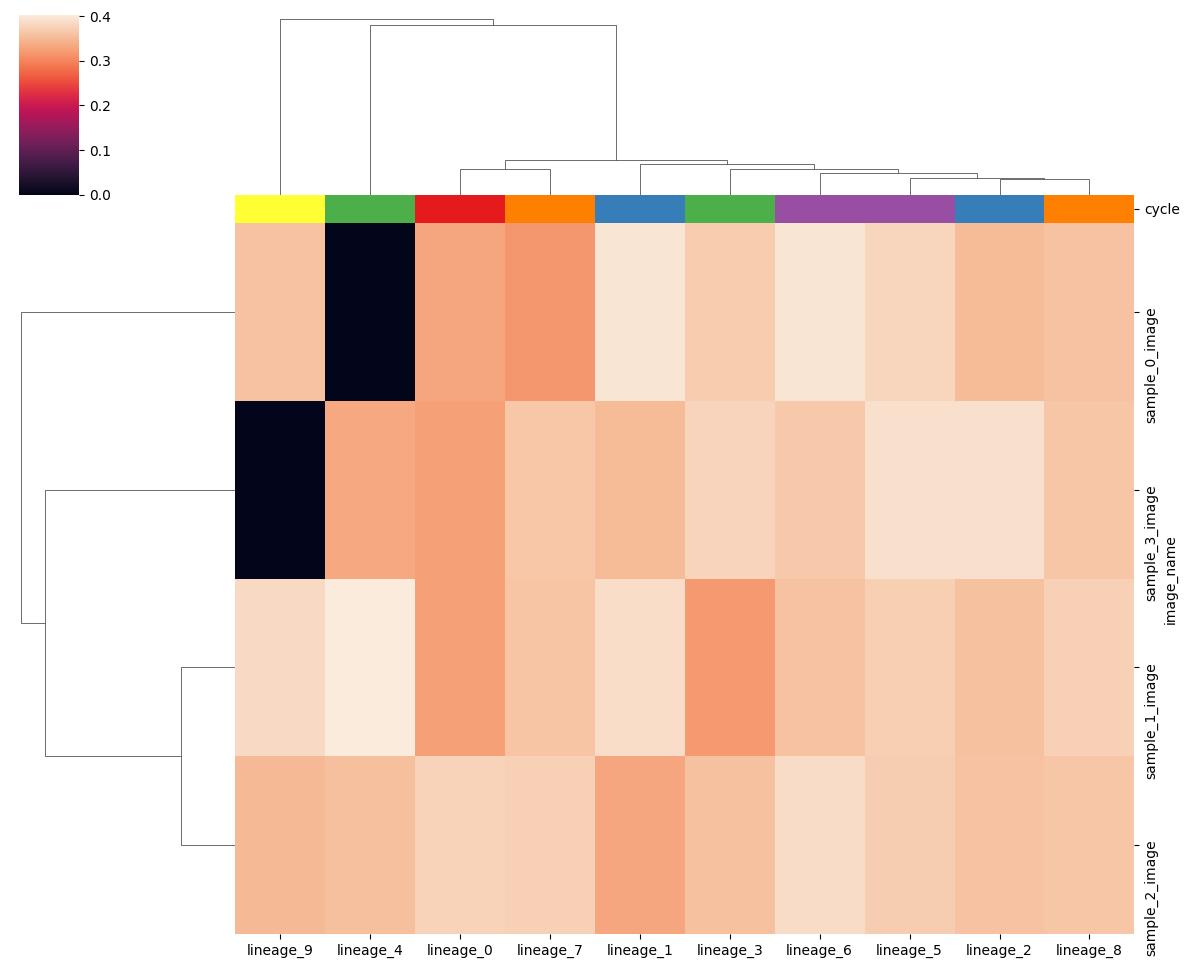
Another way is to normalize the image with a quartile normalization. The min and max quartile can greatly influence how the ends of the intensity distributions. Here we clip the signal below and above the 5th and 95th percentile. We also apply an arcsinh transformation to each channel against extreme outliers to make the heatmap more interpretable.
df_norm = harpy.pl.calculate_mean_norm(
    sdata, overwrite=True, q_min=5, q_max=95, c_mask=selected_markers[0]
)
df_norm
| lineage_0 | lineage_1 | lineage_2 | lineage_3 | lineage_4 | lineage_5 | lineage_6 | lineage_7 | lineage_8 | lineage_9 | |
|---|---|---|---|---|---|---|---|---|---|---|
| image_name | ||||||||||
| sample_0_image | 0.331322 | 0.395357 | 0.350663 | 0.368848 | 0.000000 | 0.379894 | 0.395442 | 0.316976 | 0.359809 | 0.359169 |
| sample_1_image | 0.325366 | 0.387694 | 0.357238 | 0.318276 | 0.402458 | 0.372283 | 0.359916 | 0.361338 | 0.373854 | 0.383336 |
| sample_2_image | 0.376520 | 0.330558 | 0.358838 | 0.357882 | 0.356515 | 0.370799 | 0.385876 | 0.373850 | 0.362120 | 0.349794 |
| sample_3_image | 0.323949 | 0.350711 | 0.391374 | 0.378530 | 0.332451 | 0.391408 | 0.365116 | 0.363468 | 0.362484 | 0.000000 |
# harpy.pl.clustermap(df_norm, row_colors=harpy.pl.make_cols_colors(df_metadata), figsize=(12, 10))
harpy.pl.clustermap(
    df_norm, col_colors=harpy.pl.make_cols_colors(table.var), figsize=(12, 10)
)
<seaborn.matrix.ClusterGrid at 0x37ce4b4f0>
Segmentation level quality control#
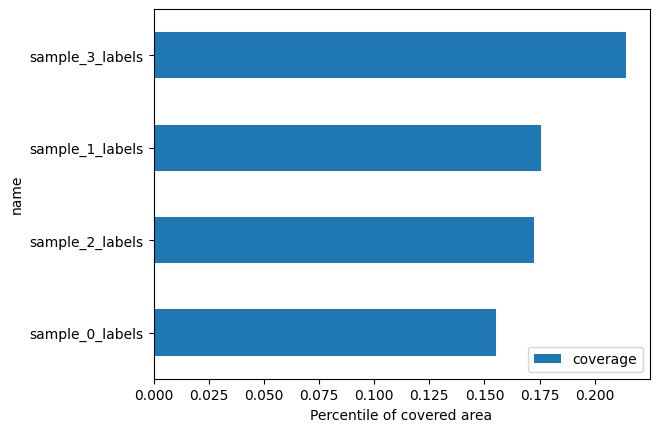
harpy.pl.segmentation_coverage(sdata)
<Axes: xlabel='Percentile of covered area', ylabel='name'>
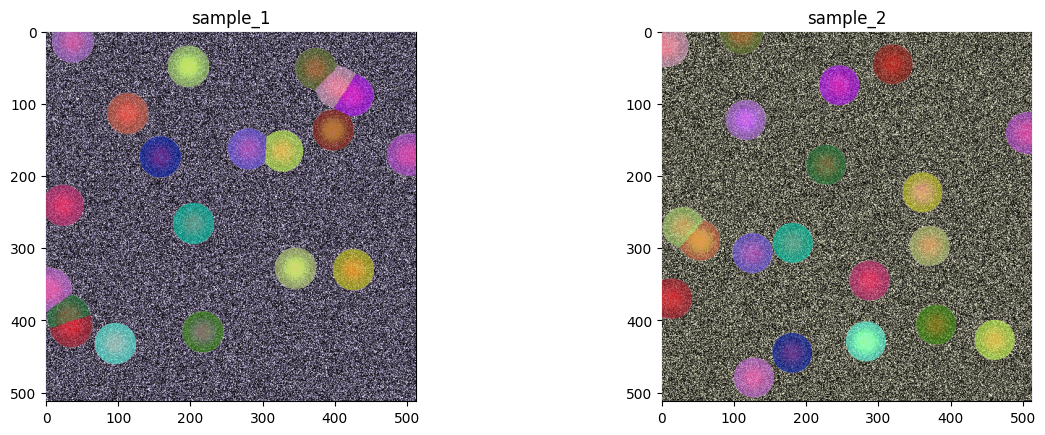
sdata.pl.render_images(channel=selected_markers).pl.render_labels().pl.show(
    coordinate_systems=["sample_1", "sample_2"]
)
harpy.pl.segmentation_size_boxplot(sdata, sample_key="fov_labels")
<Axes: title={'center': 'area'}>
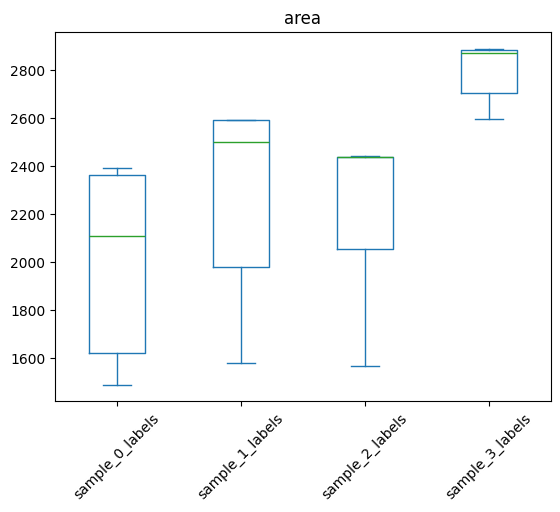
table.obs["area"].describe()
count      80.000000
mean     2349.425000
std       414.222095
min      1489.000000
25%      2069.000000
50%      2437.000000
75%      2593.500000
max      2890.000000
Name: area, dtype: float64
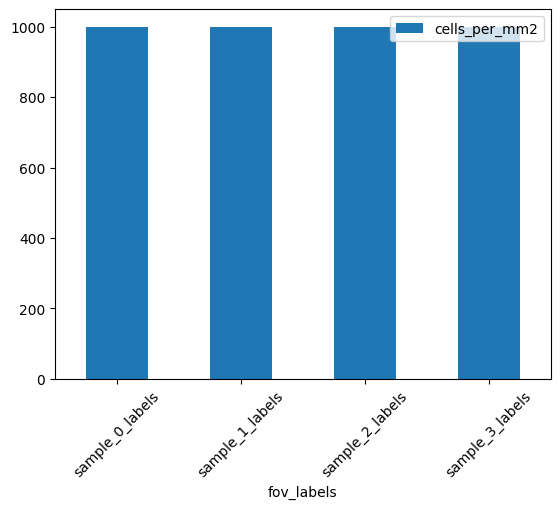
harpy.pl.calculate_segments_per_area(sdata, sample_key="fov_labels")
| fov_labels | cells_per_mm2 | |
|---|---|---|
| fov_labels | ||
| sample_0_labels | 20 | 1000 |
| sample_1_labels | 20 | 1000 |
| sample_2_labels | 20 | 1000 |
| sample_3_labels | 20 | 1000 |
harpy.pl.segments_per_area(sdata, sample_key="fov_labels")
<Axes: xlabel='fov_labels'>
Cell level quality control#
import numpy as np

table.layers["arcsinh"] = np.arcsinh(table.to_df())
table
AnnData object with n_obs × n_vars = 80 × 11
    obs: 'instance_id', 'region', 'fov_labels', 'cell_ID', 'phenotype', 'area', 'eccentricity', 'major_axis_length', 'minor_axis_length', 'perimeter', 'centroid-0', 'centroid-1', 'convex_area', 'equivalent_diameter', '_major_minor_axis_ratio', '_perim_square_over_area', '_major_axis_equiv_diam_ratio', '_convex_hull_resid', '_centroid_dif'
    var: 'cycle'
    layers: 'arcsinh'
table.to_df()
| nucleus | lineage_0 | lineage_1 | lineage_2 | lineage_3 | lineage_4 | lineage_5 | lineage_6 | lineage_7 | lineage_8 | lineage_9 | |
|---|---|---|---|---|---|---|---|---|---|---|---|
| cells | |||||||||||
| 1 | 130579.074583 | 73143.384718 | 90176.329291 | 78887.342227 | 83547.398858 | 0.000000 | 85104.954042 | 89203.618952 | 71052.452962 | 166453.784109 | 79783.723973 |
| 2 | 97747.257070 | 44127.352051 | 54403.315415 | 47592.677537 | 50404.086393 | 0.000000 | 51343.758329 | 103611.315408 | 42865.894408 | 48557.293269 | 48133.464008 |
| 3 | 129783.693347 | 72871.920340 | 89159.713324 | 77997.994298 | 82605.515103 | 0.000000 | 132335.765591 | 88197.968976 | 70251.432797 | 79581.243727 | 78884.270554 |
| 4 | 126967.536598 | 69764.494608 | 86010.594981 | 159287.142678 | 79687.890840 | 0.000000 | 81180.370216 | 85082.819414 | 67770.154343 | 76768.146443 | 76776.118424 |
| 5 | 107214.353348 | 52460.254002 | 64676.705321 | 56579.963133 | 124573.992918 | 0.000000 | 61039.388909 | 63979.053282 | 50960.585762 | 57726.734557 | 57222.870407 |
| ... | ... | ... | ... | ... | ... | ... | ... | ... | ... | ... | ... |
| 16 | 161696.495625 | 84635.637309 | 175638.724282 | 105850.500384 | 102504.128585 | 88371.831230 | 106509.552476 | 97690.881838 | 97966.012854 | 96128.415489 | 0.000000 |
| 17 | 163295.271990 | 86338.942986 | 93873.258186 | 107784.066049 | 104567.040494 | 90150.328405 | 108653.074179 | 188483.571632 | 99937.594462 | 98063.015157 | 0.000000 |
| 18 | 153201.459416 | 75869.389265 | 82490.085245 | 94714.053483 | 91887.127930 | 80816.560758 | 95477.684746 | 87572.419579 | 175560.397181 | 86171.787748 | 0.000000 |
| 19 | 154421.629069 | 153238.714827 | 83799.306745 | 96217.284748 | 93345.492327 | 80475.900902 | 96993.035800 | 88962.304123 | 89212.852472 | 88883.535945 | 0.000000 |
| 20 | 161275.579840 | 84186.643485 | 175348.640010 | 105097.641133 | 101960.342041 | 87903.016819 | 105944.517075 | 97172.629669 | 97446.301109 | 95618.452236 | 0.000000 |
80 rows × 11 columns
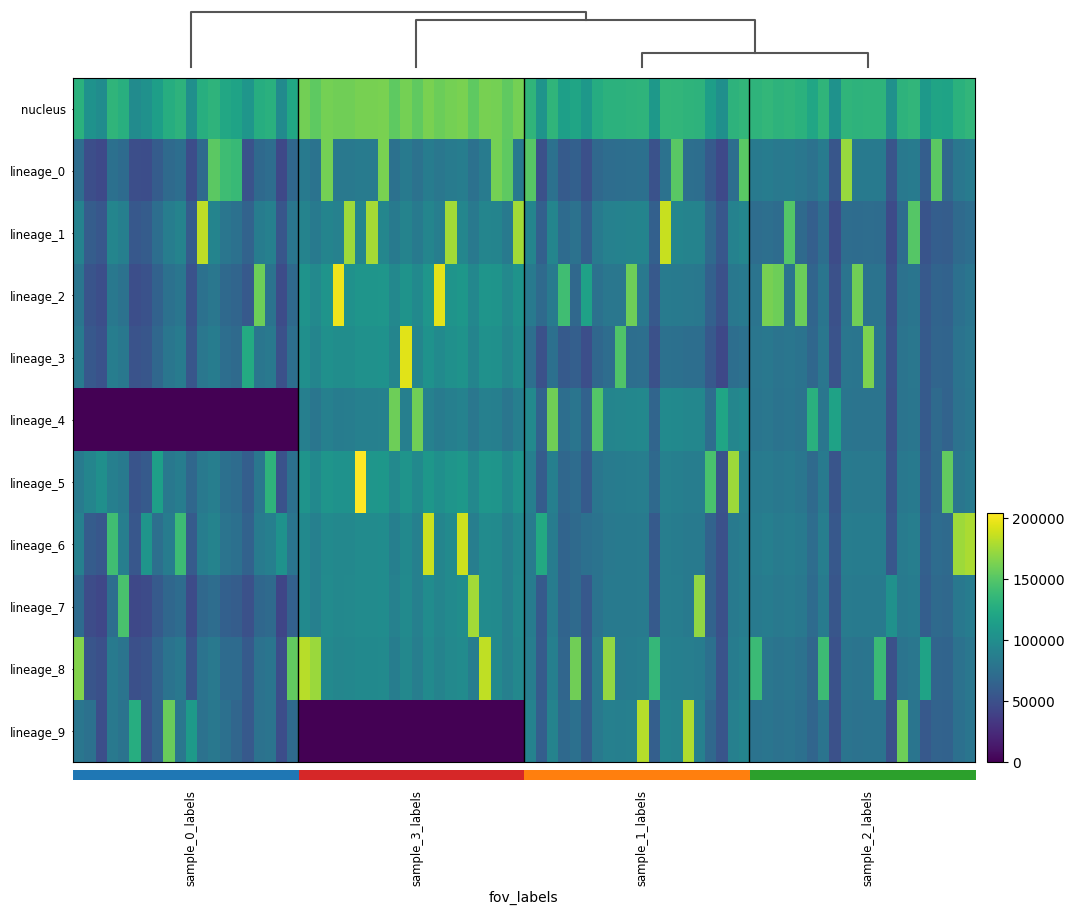
sc.tl.dendrogram(table, groupby="fov_labels")
sc.pl.heatmap(
    table,
    groupby="fov_labels",
    # var_names=used_var_names,
    var_names=table.var_names,
    swap_axes=True,
    dendrogram=True,
    figsize=(12, 10),
)
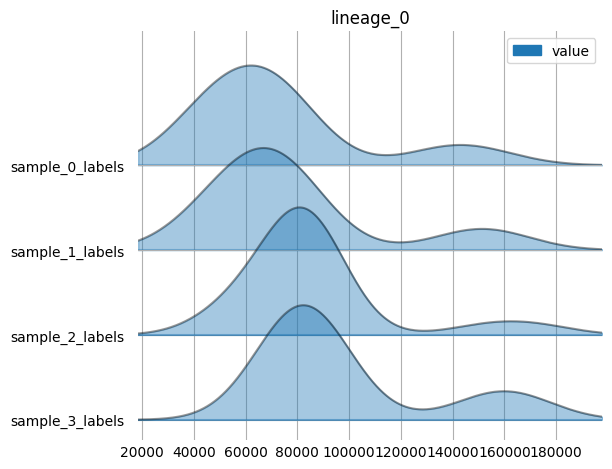
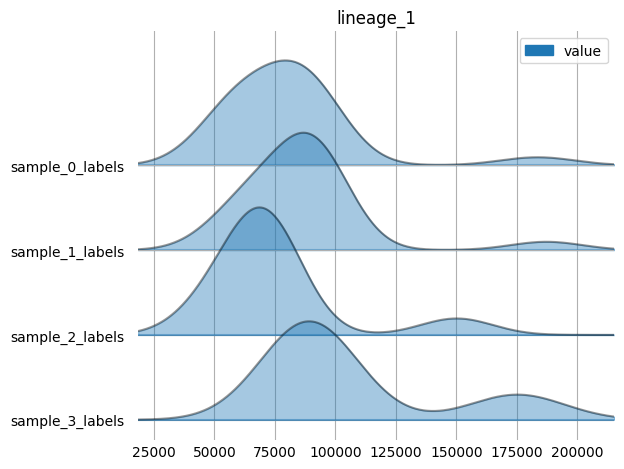
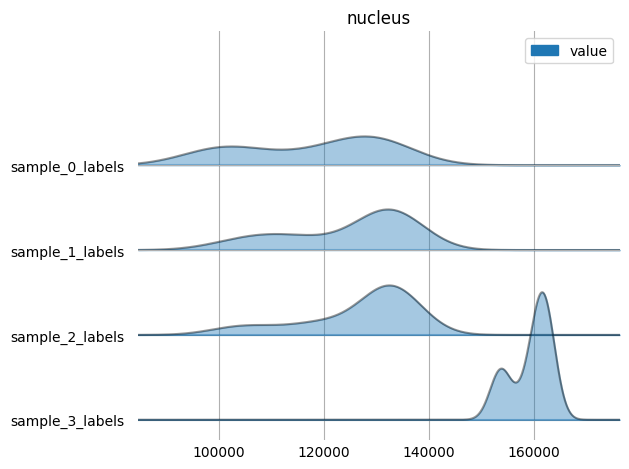
harpy.pl.ridgeplot_channel_sample(table, y="fov_labels", value_vars=selected_markers)
sc.pp.neighbors(table, n_neighbors=10, random_state=42)
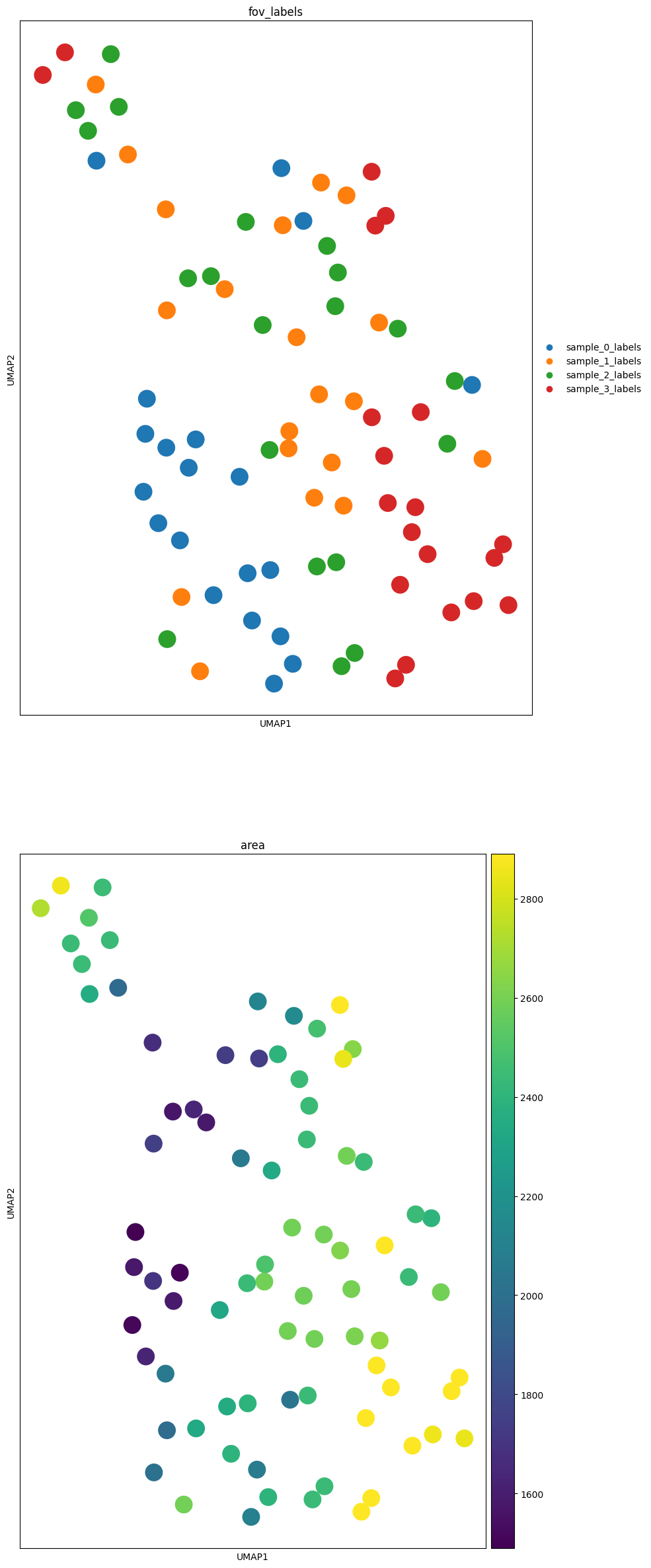
sc.tl.umap(table, random_state=42)
markers = ["fov_labels", "area"]
fig, axes = plt.subplots(len(markers), 1, figsize=(10, 30))
for c, axs in zip(markers, axes, strict=False):
    sc.pl.umap(table, color=c, ax=axs, show=False)
markers = selected_markers
fig, axes = plt.subplots(1, len(markers), figsize=(5 * len(markers), 10))
for c, axs in zip(markers, axes, strict=False):
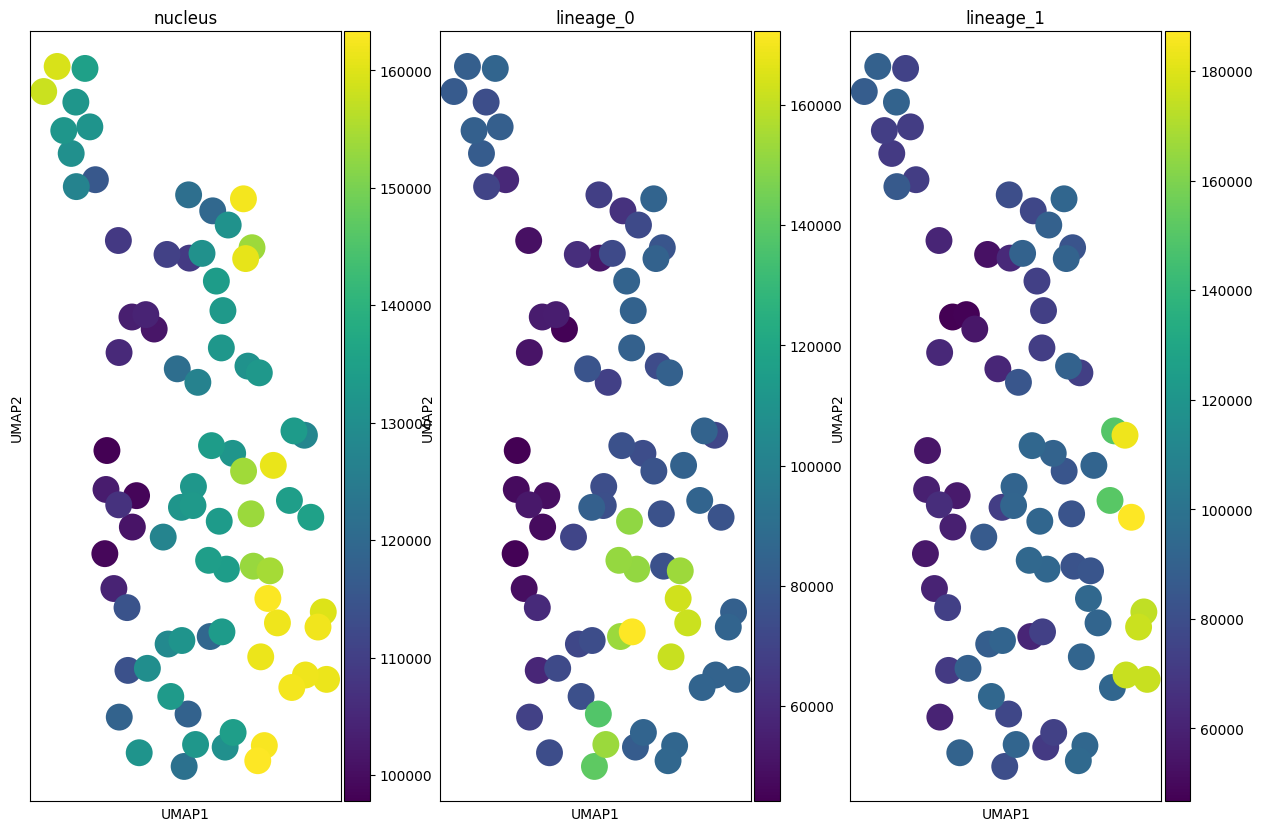
    sc.pl.umap(table, color=c, ax=axs, show=False)